Home
The Home page is the landing screen for authenticated users at /.
Page sections
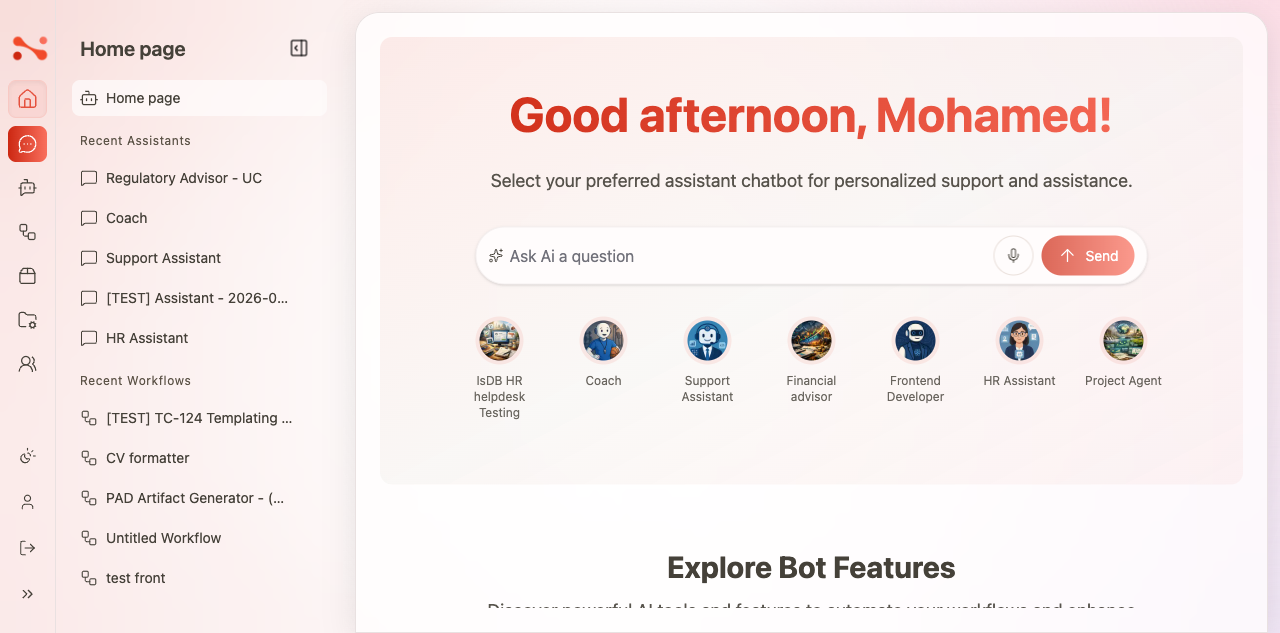
1. Greeting header
A personalized greeting that changes based on the time of day:
- "Good morning, {name}!" — morning
- "Good afternoon, {name}!" — afternoon
- "Good evening, {name}!" — evening
The subtitle reads: "Select your preferred assistant chatbot for personalized support and assistance."
2. Quick chat
A chat input bar that lets you send a message without navigating to a specific assistant first.
| Element | Behaviour |
|---|---|
| Input | Placeholder: "Ask Ai a question" |
| Voice button | Activates voice input |
| Send button | Disabled when input is empty; enabled when text is present |
Submitting the quick chat sends the message to the Noema AI Help Assistant and creates a new session at /assistants/{id}/chat/{chatId}.
3. Quick-access assistant cards
A row of 7 assistant avatar cards for one-click navigation. Each card links directly to /assistants/{id} — the assistant's chat page.
4. Explore Bot Features
Three navigation cards that link to major app areas:
| Card | Destination |
|---|---|
| Assistants | /assistants-config/dashboard |
| Workflows | /workflows-task/dashboard |
| Sources | /sources/dashboard |
5. Recent Assistants
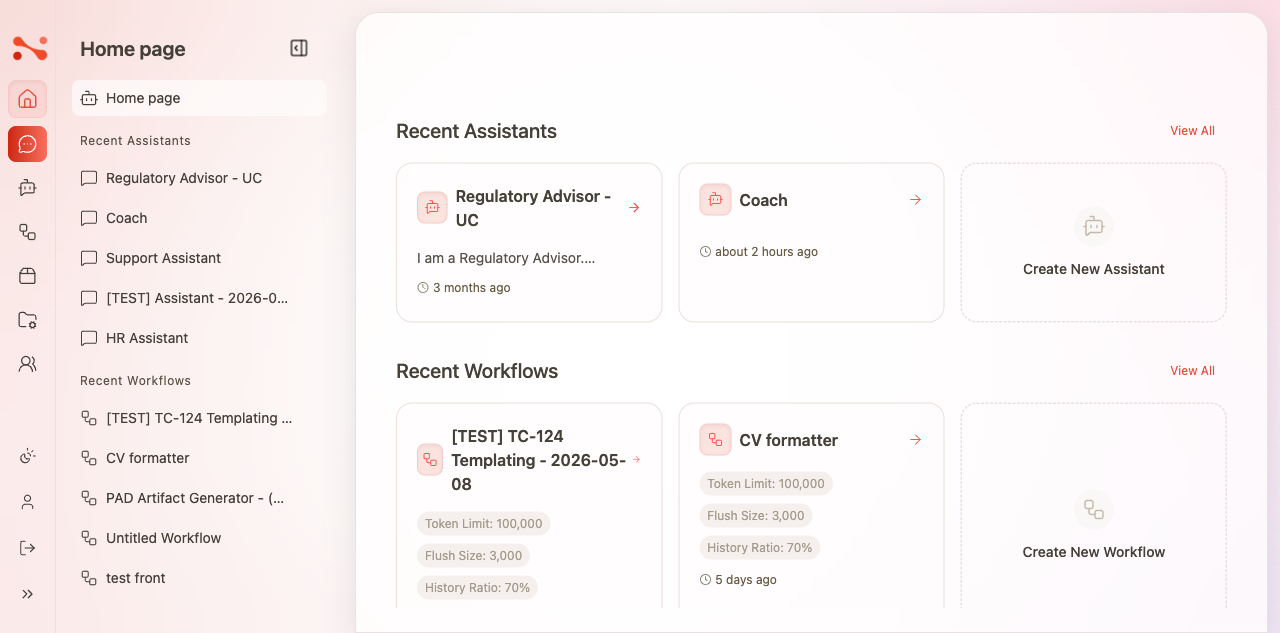
Shows the 2 most recently used assistants. Each card displays:
- Assistant name and description (welcome message)
- Relative timestamp (e.g. "5 minutes ago")
Additional links:
- View All →
/assistants-config/dashboard - Create New Assistant → opens the create dialog at
/assistants-config/dashboard?create-new-assistant
6. Recent Workflows
Shows the 2 most recently used workflows. Each card displays:
- Workflow name
- Token Limit, Flush Size, History Ratio
- Relative timestamp
Additional links:
- View All →
/workflows-task/dashboard - Create New Workflow → opens the create dialog at
/workflows-task/dashboard?create-new-workflow
7. All Assistants grid
A full grid of all visible assistants. Each card shows:
- Avatar and assistant name
- Description
- Created date
- Feature badges: Show Quote, Text To Speech, Timeout
8. Sidebar recent panel
The sidebar panel shows:
- Recent Assistants — the 5 most recently used assistants
- Recent Workflows — the 4 most recently used workflows
Recent items update after each interaction — using an assistant moves it to the top of the recent list.
Business rules
| Rule | Behaviour |
|---|---|
| Greeting is time-based | Morning / afternoon / evening based on current time |
| Quick chat routes to a fixed assistant | Messages go to Noema AI Help Assistant |
| Send button requires input | Disabled when the text field is empty |
| Recent Assistants shows last 2 used | Ordered by most-recently-used |
| Recent Workflows shows last 2 used | Ordered by most-recently-used |
| Sidebar shows 5 recent assistants + 4 recent workflows | Fixed count limits |
| Recent items update on use | Using an assistant moves it to the top of the recent list |
| Quick-access cards link to assistant chat | Direct navigation to /assistants/{id} |
| View All links go to management dashboards | Not to the chat page |