Manage conversations and sessions
Noema separates your saved chat conversations from the administrative view of assistant sessions.
Find a saved conversation
Open an assistant's chat at /assistants/{assistantId}. The history panel lists saved conversations. Search by title, then select a conversation to restore its messages.
Use New Thread to begin a separate conversation. Previous conversations remain in history unless deleted.
Rename or delete a conversation
Open the conversation's actions menu in the history panel:
- Rename: enter a non-empty title and save.
- Delete: use the available delete action and complete the confirmation flow.
These actions require update or delete permission on the chat. If an action is missing, see permission troubleshooting.
Review assistant sessions
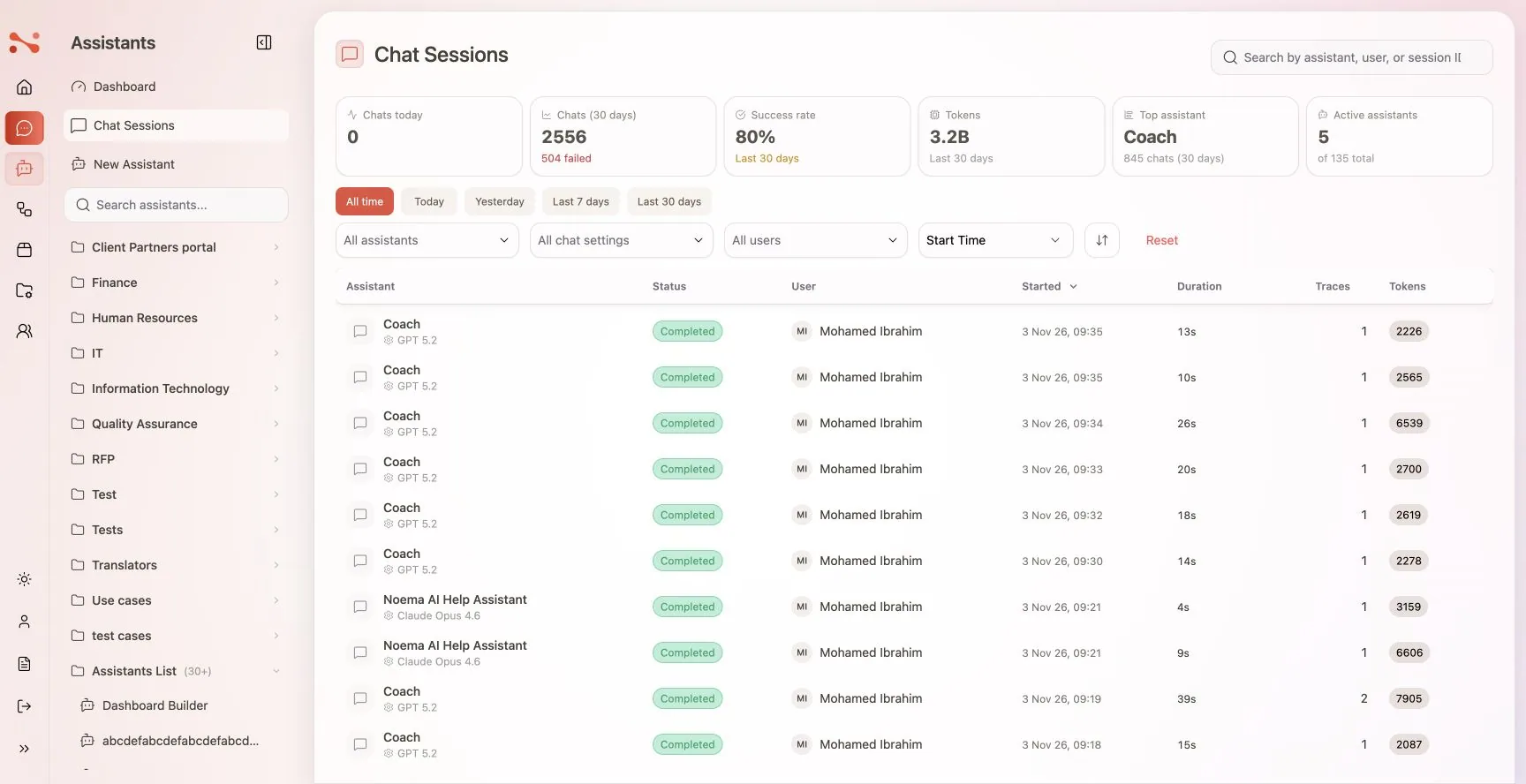
Users with dashboard access can open Assistants → Sessions at /assistants-config/sessions.
Use the available search, assistant, LLM chat setting, user, date, and sorting controls to narrow the list. Selecting a session opens its details, including identifiers, timestamps, duration, tokens, and traces. The list loads additional results as you browse.
This view helps administrators investigate usage and failed traces. It does not provide a customer-service queue with human takeover, sentiment routing, or assigned support agents.
Improve results
Review the assistant's prompt, model configuration, and attached sources when responses are incomplete or inaccurate. Verify that relevant documents have finished ingestion and that the assistant can access them.